Top 10 AI Plugins Transforming WordPress Web Design


You want to build a stunning website without spending weeks on design and edits. AI tools for WordPress web design now give you that power. These plugins let you cut production time by up to 50%, create content and layouts in minutes, and get real-time suggestions for better user experience. You save money, launch faster, and see fewer revisions.
Faster time-to-launch
Smarter design ideas
Cost savings from fewer edits
Key Takeaways
AI plugins help you build and update WordPress sites faster, cutting design time by up to half.
These tools boost creativity by offering instant design ideas, content suggestions, and real-time layout changes.
AI improves user experience with chatbots, personalised content, and smart SEO, keeping visitors engaged.
Top AI plugins cover different needs like content creation, SEO, chat support, and image optimisation.
Choose AI plugins that fit your site’s goals, work well with your setup, and offer good support for best results.
Why Use AI Tools for WordPress Web Design

Efficiency
You want your website up and running quickly. With ai tools for wordpress web design, you can skip many slow, manual steps. These tools help you build pages, update content, and even create images in just a few clicks. Take a look at how people use AI in WordPress:
Percentage of Users | Description | |
|---|---|---|
Building entire websites | 25% | Developers using AI to create full WordPress sites |
Updating existing pages | 59% | Users relying on AI to maintain and update site content |
Content creation | 55% | AI used for generating blog posts, page copy, headlines, and product descriptions |
Visual generation | 53% | AI tools creating images and visuals for websites |
SEO tasks | 40% | AI assisting with keyword research, content recommendations, internal linking, and analytics |
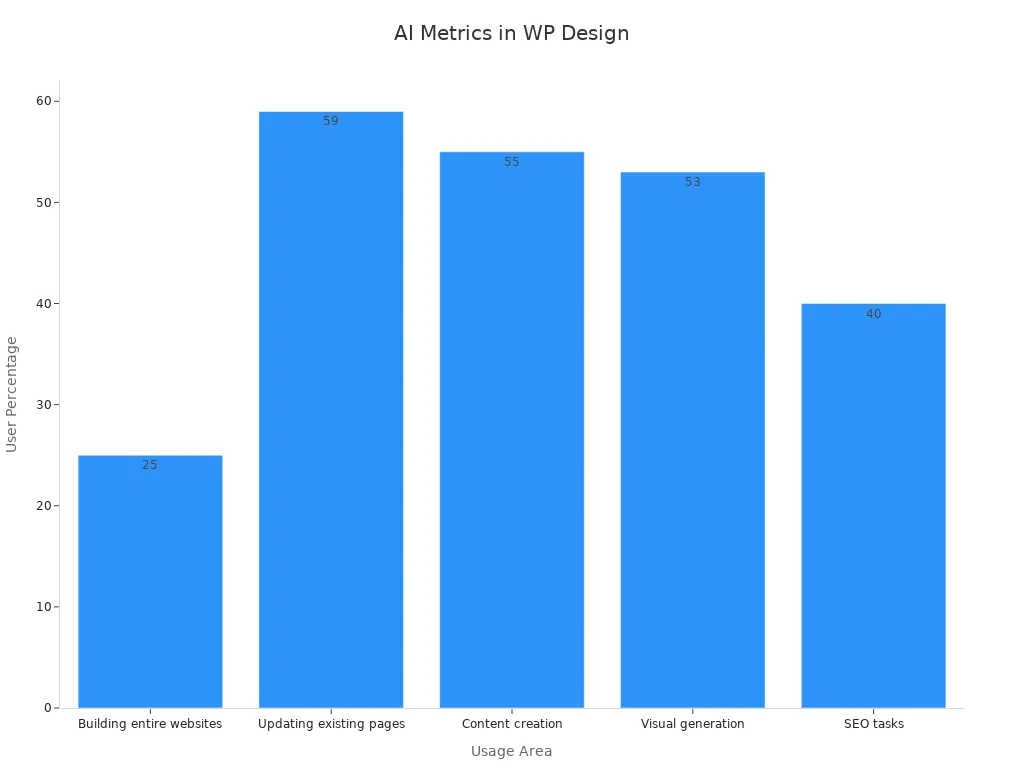
You can see that most people use AI to update pages and create content. Designers finish projects up to 50% faster with these tools. You spend less time on boring tasks and more time on what matters.
Creativity
AI tools for wordpress web design open up new creative options. You can try out different layouts, colours, and images in real time. Want to see how a new design looks? Just ask the AI. Big sites like TechCrunch and The New York Times use AI to suggest content and change layouts based on what readers like. AI even helps you test which headlines or images work best, so your site always looks fresh and interesting.
AI suggests trending topics and keywords for your blog.
It updates your content to match what your audience wants.
You get instant design ideas that match the latest trends.
You get more creative freedom because the AI handles the technical stuff for you.
User Experience
A great website keeps visitors happy and coming back. AI plugins make your site smarter and more helpful. For example, chatbots answer questions right away, so visitors don’t have to wait. AI recommends articles or products based on what each person likes. This means people spend more time on your site and are more likely to buy or sign up.
Use Case | AI Plugin Feature | User Satisfaction Metrics / Impact |
|---|---|---|
Online Lifestyle Magazine | AI-driven Personalised Content | |
Outdoor Gear E-commerce Site | AI Chatbot Assistance | 40% fewer support tickets; 20% higher conversion rate |
Real Estate Listing Website | AI-Optimised Search | 35% more engagement; 15% more leads |
Travel Blog | AI-Powered SEO Tool | 50% more organic traffic; 20% more ad revenue |
You get a site that feels personal and easy to use. AI even helps keep your site safe by spotting threats before they cause trouble.
Top 10 AI Plugins 2025

You have so many choices when it comes to ai tools for wordpress web design. The plugins below stand out for their innovation, popularity, and real-world results. Let’s look at what makes each one special and how you can use them to build better sites.
Did you know?
Over 93% of web designers now use AI plugins, and AI website builder interest has grown by 50% year-over-year.
SeedProd
SeedProd helps you build landing pages and full themes with ease. You get a drag-and-drop editor that anyone can use, even if you have no coding skills. With over 1 million active installs, SeedProd is trusted by many.
Key Features:
300+ ready-made templates for different industries
Mobile-friendly designs
Conversion tools like opt-in forms and countdown timers
Fast page loading for better SEO
Email marketing integration with top services
Pros:
Very easy to use
Quick setup
Powerful design tools
Cons:
Some advanced features need a premium plan
Best For:
You want to launch landing pages fast or build custom themes without hiring a developer.
Pricing:
Free version available. Premium plans unlock more features.
Metric / Feature | Details |
|---|---|
Active Installs | 1M+ |
Templates | 300+ |
User Feedback | Praised for ease of use and quick setup |
Pricing | Free & Premium |
Elementor AI
Elementor AI powers over 9.3 million live websites. You can create beautiful pages with its drag-and-drop builder and add AI features for smarter design.
Key Features:
Dynamic content and theme building
Custom CSS for advanced users
Integration with WPForms for higher conversions
Works well with Yoast SEO for more visitors
Image optimisation for faster loading
Pros:
User-friendly interface
Huge template library
Boosts SEO and conversions
Cons:
Some features only in Pro version
Best For:
You want a flexible page builder with AI that helps you design, optimise, and launch sites quickly.
Pricing:
Free version with paid upgrades for advanced tools.
Feature/Metric | Elementor Data |
|---|---|
Live Websites | 9.3M+ |
Conversion Rate (WPForms) | +29.13% |
SEO Traffic Increase (Yoast) | +20-30% |
Divi AI
Divi AI makes web design faster and smarter. 80% of users say they cut design time in half. You get more page views and happier clients.
Key Features:
AI-powered design suggestions
Real-time content and layout generation
Easy integration with Divi Builder
Pros:
Saves lots of time
Improves engagement and conversions
High client satisfaction
Cons:
Works best with Divi Builder
Some features need a subscription
Best For:
You want to speed up design and boost site performance with AI-driven layouts.
Metric | Statistic | Benefit |
|---|---|---|
Time Savings | 50% faster | More projects, less work |
Engagement | +30% | More views, more sales |
Satisfaction | 90% happy clients | Better user experience |
Tidio
Tidio brings AI chatbots and live chat to your WordPress site. You can answer questions fast and help more visitors at once.
Key Features:
AI chatbots for 24/7 support
Live chat with fast response times
Handles up to 29 conversations per agent daily
Pros:
Quick replies (average 1 min 35 sec)
Boosts customer satisfaction
Easy to set up
Cons:
Some advanced automation needs a paid plan
Best For:
You run an online shop or service site and want to help visitors instantly.
Rank Math
Rank Math is your AI-powered SEO assistant. Over 3 million users trust it to boost their search rankings.
Key Features:
40+ AI tools for content and SEO
Dynamic keyword suggestions
Content analysis and readability checks
Pros:
Automates SEO tasks
Tracks keyword rankings and site health
Easy to use dashboard
Cons:
Full analytics needs setup
Some features in Pro version
Best For:
You want to improve your site’s SEO and get more traffic with less manual work.
Data Point | Description |
|---|---|
User Base | 3M+ users |
AI Tools | 40+ for content and SEO |
Analytics Integration | Google Analytics & Search Console |
Bertha AI
Bertha AI helps you write and design faster. You can generate text and images for your site in seconds.
Key Features:
SEO suggestions for better rankings
Works with popular page builders
Multilingual support
Pros:
Speeds up content creation
Easy to use interface
Flexible integration
Cons:
Some users find pricing high
Limited customisation for advanced users
Best For:
You need quick, creative content and images for your WordPress site.
Feature | Benefit |
|---|---|
Fast blog posts and product descriptions | |
Image Generation | Easy visual creation |
SEO Tools | Better search rankings |
ContentBot.ai
ContentBot.ai gives you AI writing tools right inside WordPress. You can create blog posts, product descriptions, and more with just a few clicks.
Key Features:
AI-powered content generation
Templates for different content types
Plagiarism checker
Workflow automation
Pros:
Saves time on writing
Reduces writer’s block
Supports multiple languages
Cons:
Some features require a paid plan
May need editing for tone
Best For:
You want to fill your site with fresh content quickly and keep your blog active.
Jetpack AI Assistant
Jetpack AI Assistant stands out for content creation. It helps you write posts, generate tables, translate text, and check grammar—all inside the WordPress editor.
Key Features:
Complete post and page creation
Title and summary suggestions
Table and form generation
Translation and grammar tools
Pros:
Seamless integration with WordPress
High-quality content output
Easy for beginners
Cons:
Some advanced features need a subscription
Best For:
You want an all-in-one content assistant that saves you hours every week.
Tip:
Jetpack AI Assistant is often rated the best for content creation among ai tools for wordpress web design.
AI Engine
AI Engine brings advanced AI to your site. You can generate content, automate tasks, and even add chatbots.
Key Features:
Connects to OpenAI for smart content
Chatbot integration
Automation for repetitive tasks
SEO-friendly content
Pros:
Customisable templates
Tracks AI usage and performance
Cons:
Some features only in PRO plan
Needs setup for best results
Best For:
You want to automate content and support, and you like customising your AI tools.
Feature | Details |
|---|---|
User Rating | 4.8/5 |
Content Generation | Text and images |
Automation | Scheduling, internal linking |
Pricing |
WordLift
WordLift uses AI to boost your SEO and content quality. Over 12,000 websites use it to get more traffic and better rankings.
Key Features:
Automated schema markup for rich results
Internal linking suggestions
Content enrichment and entity recognition
Analytics for content performance
Pros:
Increases organic traffic (up to 25% in 6 months)
Improves click-through rates and dwell time
Reduces manual SEO work
Cons:
Advanced features may need a paid plan
Learning curve for beginners
Best For:
You want to improve your site’s visibility and SEO with smart automation.
Metric Description | Value/Result |
|---|---|
Organic Traffic Increase (6 mo) | +25% |
Bounce Rate Decrease | -18% |
Top 3 Google Rankings (90 days) | 67% of users |
Plugin Rating | 4.7/5 |
You can see that these ai tools for wordpress web design cover everything from building pages to boosting SEO and automating support. Each plugin brings something unique, so you can pick the right one for your needs.
Comparing AI Tools for WordPress Web Design
Features Overview
When you look at the top ai tools for wordpress web design, you see that each plugin brings something different to the table. Some focus on content, others on SEO or images. Here’s a quick look at how they compare:
Plugin Name | Pricing (Free / Paid) | Key AI Features | Target Users / Use Cases |
|---|---|---|---|
AI Engine | Free; Paid from $59/year | Content & image generation, task automation, virtual assistant | Users needing comprehensive AI content and automation tools |
Rank Math | Free; Paid from $5.99/month | AI-powered SEO content creation, keyword suggestions, FAQ schema | Content creators, bloggers, SEO-focused writers |
Elementor AI | Free; Paid from $48/year | AI-generated layouts, images, text, code; integration with Elementor widgets | Website owners using Elementor builder |
ShortPixel | Pricing varies | AI-powered image optimisation and compression | Users focused on image performance and optimisation |
You can see that some plugins, like AI Engine, offer a wide range of features. Others, such as ShortPixel, focus on a single area like image optimisation.
Pros and Cons
Every plugin has its strengths and weaknesses. If you want an all-in-one solution, AI Engine gives you content, images, and automation. It may take a bit longer to set up, but you get more control. Rank Math shines for SEO, helping you climb search rankings quickly, though you might need to learn some SEO basics first. Elementor AI makes design easy, but you need to use the Elementor builder. ShortPixel is perfect if you want fast-loading images, but it does not help with content or SEO.
Tip: Choose a plugin that matches your main goal. If you want better SEO, go for Rank Math. If you want to speed up your workflow, try AI Engine.
Use Cases
You might run a blog and need fresh content every week. AI Engine or ContentBot.ai can help you write posts fast. If you own a shop, Tidio’s chatbots can answer customer questions day and night. For those who want a beautiful site without coding, Elementor AI or Divi AI make design simple. If you care most about search traffic, Rank Math or WordLift will boost your SEO.
You do not need to use every plugin. Pick the ones that fit your needs and watch your site improve with ai tools for wordpress web design.
Choosing the Right AI Plugin
Compatibility
You want your AI plugin to work smoothly with your WordPress site. Start by checking if the plugin supports your theme and any page builders you use, like Elementor or Gutenberg. Many ai tools for wordpress web design now work with popular frameworks and plugins, including WooCommerce and Contact Form 7. Some plugins even offer APIs, so you can connect them with other tools. Always look for plugins that mention compatibility with your current setup. This helps you avoid conflicts and keeps your site running fast.
Make sure the plugin works with your WordPress version.
Check for integration with your favourite page builder.
Look for support with eCommerce or contact form plugins.
Choose plugins that update often for better security.
Features
Think about what you want the AI plugin to do. Do you need help with SEO, content creation, or customer support? Some plugins focus on one thing, while others offer a full set of features. Use this table to compare what matters most to you:
Feature | What It Does |
|---|---|
Content Generation | Writes blog posts, product descriptions, and more |
SEO Optimisation | Improves rankings and tracks keywords |
Chatbot Support | Answers visitor questions automatically |
Image Management | Creates and optimises images |
Analytics | Shows how your site and content perform |
Pick a plugin that covers your main needs and lets you customise settings.
Pricing
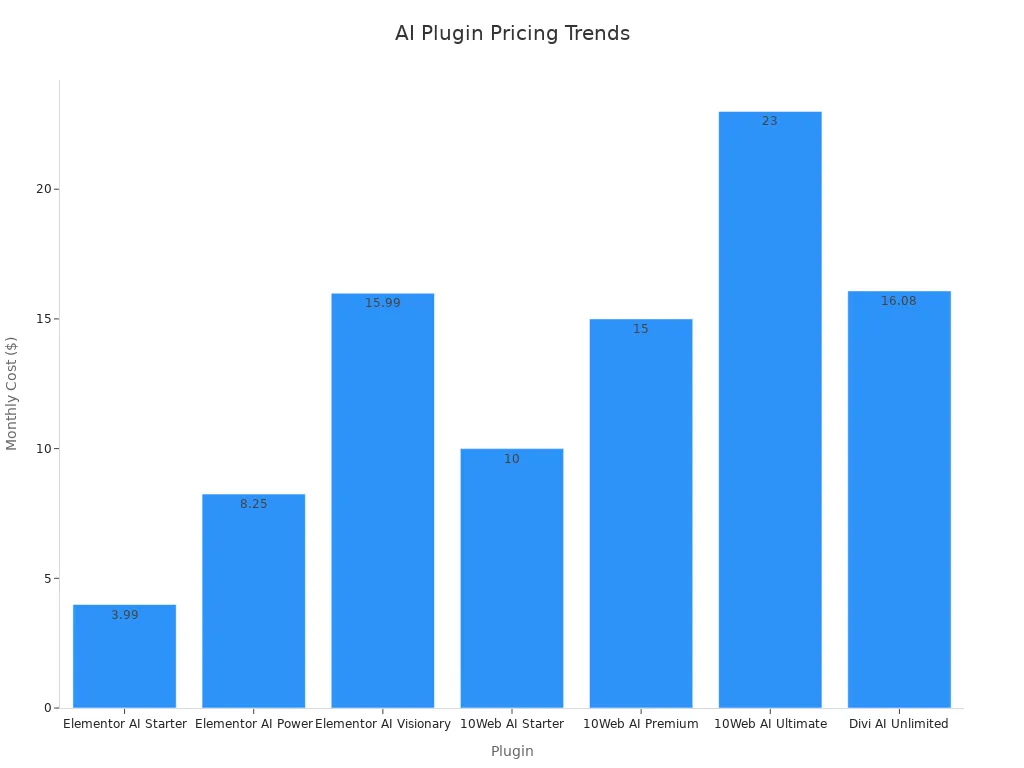
AI plugins come in all price ranges. Some offer free versions with basic features, while others have paid plans for more power. You might see monthly or yearly pricing. Compare what you get for the price. For example, Elementor AI starts at $3.99 per month, while Divi AI Unlimited costs about $16 per month. Some plugins bundle hosting, AI, and support together. Use free trials to test before you buy.
Tip: Always check if you need another paid plugin, like a page builder, to use the AI features.
Support
Good support makes a big difference. Look for plugins with clear guides, video tutorials, and active forums. Some offer live chat or email help. Regular updates and a helpful community mean you get answers fast if you run into trouble. Choose plugins with strong support, especially if you are new to ai tools for wordpress web design.
AI plugins have changed how you design WordPress sites. You now build faster, create smarter content, and offer a better experience for visitors. Picking the right tool matters. Your goals and site needs guide your choice.
Ready to see what AI can do?
Try a few plugins from this list. You might find your new favourite way to design in 2025! 🚀
FAQ
What is an AI plugin for WordPress?
An AI plugin adds smart features to your WordPress site. You can use it to create content, improve SEO, or chat with visitors. These tools help you work faster and make your website more engaging.
Do I need coding skills to use AI plugins?
No, you do not need coding skills. Most AI plugins offer simple interfaces. You can drag and drop, click buttons, or follow easy steps. Anyone can use them, even if you are new to WordPress.
Will AI plugins slow down my website?
Most AI plugins run smoothly and do not slow your site. Always check reviews and test the plugin first. Choose plugins that update often and work well with your theme.
Tip: Keep your plugins updated for the best speed and security.
Can I use more than one AI plugin at the same time?
Yes, you can use several AI plugins together. Make sure they do not conflict. Test your site after adding each plugin. If you see problems, try turning off one plugin at a time.